Table Of Contents
TL;DR
- What it is: one folder of Markdown files, Claude Code as the agent that reads and writes it, and read-only connections to the company’s systems (issue tracker, wiki, drive, git hosting).
- What it does: it prepares one-on-ones, produces team statistics you can defend, writes interview feedback and keeps decisions findable. The notes about your people stay your own.
- Why it gets better: a harvest reads your past sessions and turns every correction into a rule that is loaded the next time you work on that topic. The template is on GitHub: manager-ai-os.
A manager’s work is context
An engineer’s work ends up in a repository. A manager’s work ends up in other people’s heads, and what it is made of is context. What did I agree with the team lead three weeks ago? Why did we move that release? Where does the number on slide four come from, and who is counted in it?
That context is spread over an issue tracker, a wiki, a document drive, a chat tool, a notebook and my memory. Memory is the weakest of the six. Before a one-on-one, most managers scroll through old notes for a few minutes and still miss the promise they made the month before.
Note-taking apps solve the storage problem. They do not do any work. They cannot look into the issue tracker, they do not know who is on which team, and they forget every correction the moment I close the window.
In my current CTO mandate I work out of a different setup, and I have done so for months. This article describes it: what is proven, what is new, and where the limits are. The generic core is available as a template.
The idea in one paragraph
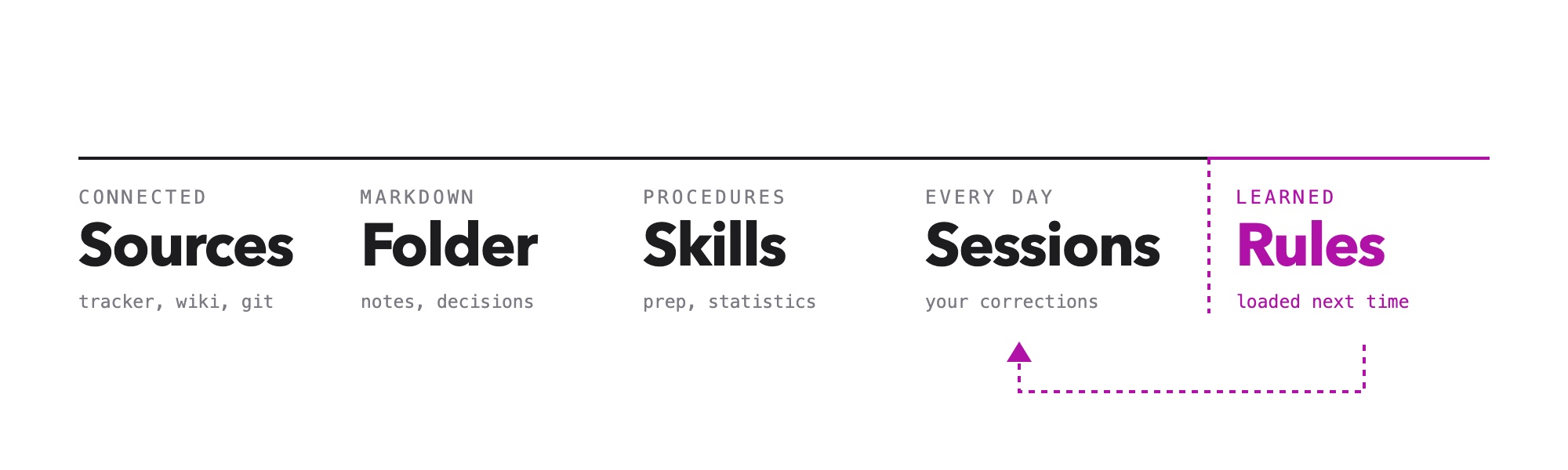
The setup has three parts and one loop. The first part is a folder of plain Markdown files: one-on-one notes, decisions, hiring, documents. The second is an agent that can read and write that folder, in my case Claude Code. The third is a set of connections to the systems the company already uses. The loop is what makes it a brain instead of an archive: what I correct in one session becomes a rule in the next.
Plain files matter more than they seem to. An agent reads and writes Markdown natively, searches a thousand files in a second and shows every change as a diff. No app, no database, no export. I use the same deliberately boring setup to run a newspaper, and I described it in One Editor and an AI.
Connect the company’s sources
A folder alone is a diary. It becomes useful for management when the agent can compare my notes with what actually happened.
The standard for that is MCP, the Model Context Protocol. An MCP server, often called a connector, gives the agent a set of tools for one system: search tickets, read a page, list commits.
| Source | What the second brain gets from it |
|---|---|
| Issue tracker (Jira, Linear) | What moved last week, what is stuck, how the roadmap is split |
| Wiki (Confluence, Notion) | Role descriptions, process pages, incident reviews |
| Document drive | Planning sheets, decks, contracts |
| Git hosting (GitHub, GitLab) | What was merged, by which team, for which ticket |
| Calendar | Today’s meetings, so the right notes are open |
| Chat | Channel history when you reconstruct an incident |
There are three ways to connect a system, best first:
- A connector you sign in to in the browser. No token ends up on your disk.
- An MCP server with a token. The configuration file holds only the name of an environment variable, never the value.
- No connector at all. A read-only API token and a short file that describes the calls. In my setup, the tracker and the wiki run through a connector. Everything else is a plain API call, because no working connector existed. That is fine.
Start read-only. The agent needs to read tickets to prepare a meeting. It does not need to edit them. Give write access for one system and one task when the day comes.
Write the traps down. Every system has them. A search that returns a short view and leaves fields out without saying so. Finished tickets that have no finish date, because the workflow never sets one. A project you cannot see that looks exactly like a project with no tickets. Each of these produces a wrong number without any error message. They now sit in a reference file per system, together with the IDs of fields and projects, so the agent does not rediscover them in every session.
A lean folder structure
Seven entries on the top level are enough. Every extra folder is one more place where things get filed and never found.
manager-ai-os/
├── one-on-ones/     one file per person
├── reviews/         written reviews
├── hiring/          one folder per candidate
├── decisions/       one file per decision
├── documents/       memos, decks, plans
├── analysis/        numbers you can produce again
└── tasks.md         your own to-do list
| Folder | What goes in, and how it is named |
|---|---|
one-on-ones/ | Your notes, one file per person: dana.md |
reviews/ | Half-year reviews, built from the dated notes: dana-2026-h2.md |
hiring/ | One folder per candidate with notes, transcript and feedback. Every file starts with the date |
decisions/ | What was decided, why, and when to look again: 2026-11-03-topic.md |
documents/ | Everything you hand to somebody else, in a dated folder: 2026-11-20-topic/ |
analysis/ | Scripts, raw data and the result. One folder per question, with a README |
Two rules do most of the work. Dates are written 2026-11-25 and come first, so every folder sorts itself by time. And people are found by first name, so “prepare my one-on-one with Dana” needs no lookup.
The agent’s own files live in a hidden folder next to these: a description of the organization, the reference files, the rules and the skills.
The one-on-one file
This is the most important file in the folder, and the one place where I want the least automation.
# 1:1 Dana

## Observations
### Good
- 2026-11-04 said no to the export feature and offered a smaller version
### To improve
- 2026-10-21 roadmap update came two days late, second time this quarter

## Next
### Hiring: two candidates in the last round, who decides?

## 2026-11-12
### ✓ Latency goal
### Promotion case Priya
Dana sends the written case until 2026-11-19.
The notes are mine. I write them myself. An agent that writes my observations about a person would also start to form my opinion about that person. It may read the file. It may not tidy it.
The agenda fills itself during the week. When something comes up on a Tuesday, it becomes a heading under “Next”. On Thursday the agenda is already there.
Observations get a date and an example. “Took over the release when the lead was out and shipped on time” can be used in a review six months later. “Shows ownership” cannot. With dated observations, a half-year review is built from six months of evidence. Without them it is built from the last three weeks.
Retrieval is where the agent earns its place. “Did I talk to Dana about the on-call load, and what did we agree?” comes back with the file and the line. Questions of this kind came up in six of my sessions. The answer also says what is not documented, which is often the more useful half.
The template adds a skill that prepares the next meeting: open items without a check mark, promises with a name on them, my observations since last time, and what the person’s team moved in tracker and git. One screen, five minutes before the meeting. This skill is new and I say so below. If you want the basics of the meeting itself, I wrote them down in One-on-One - Best Practices.
Skills: procedures you write once
A skill is a Markdown file that describes a procedure: what to read, in which order, what the result looks like, and what is not allowed. I start it by typing its name. It turns “explain what I want again” into one command.
| Skill | What it does | Status |
|---|---|---|
/session-learnings | Turns corrections from past sessions into rule files | Proven |
/weekly-team-summary | What each team did last week, from tracker and git | Proven |
/ticket-quality | Ticket hygiene per team, with a grade | Proven |
/roadmap-mix | Product, technical and customer-forced work per team | Proven |
/prep-one-on-one | The next one-on-one on one screen | New |
/morning-brief | Today’s meetings, tasks, what moved since yesterday | New |
/interview-feedback | Notes and transcript become a feedback report | New |
/log-decision | Writes a decision down with options, reason and review date | New |
Four of them come from my own workspace and have run against real data. Four are new: they turn things I did by convention into a procedure. Expect to correct a new skill a few times before it fits you.
Keep the company out of the skill. My first skills had the team roster and the project keys written into them. Three skills, three copies, and over time they disagreed with each other. The template has one file that describes the organization, and every skill reads it. The skill holds the procedure, the file holds the company.
That split is what makes a skill shareable. Some skills are generic. Others are specific to your company: how a customer-reported bug is defined, which labels mean roadmap work, what counts as done. Those are the ones to share with the other managers, through a shared repository. When every manager computes ticket quality in a private spreadsheet, the meeting is about whose method is right. When the method is a file that everybody can read and change, the meeting is about the tickets.
Statistics across teams you can defend
Three skills produce numbers across all teams.
- The weekly summary reads every ticket that changed status and every commit of the week, maps both to teams and says in three paragraphs per team what was finished, what is in progress and what is stuck.
- Ticket quality runs ten weighted checks on the tickets of a quarter: is there an owner, a description, acceptance criteria, a size, an epic. Each team gets a grade from A to D and the ten tickets most worth fixing.
- The roadmap mix shows how many roadmap items per team are product work, technical work and work forced by a customer or a law.
Numbers from an AI deserve suspicion. Four rules made mine defensible.
- Every headline number gets a footnote when it goes in: source, scope, period, who is counted.
- “Not found” is not “missing”. Before the agent writes “there is no data on X”, it searches the whole folder and the tracker and words the result as “not found in these places”. This was my most repeated correction.
- A number that will be asked about again gets a folder. A README with the question and the definitions, a script that pulls the data, a script that computes, and the raw data. When the board asks in March how the November figure was calculated, the answer is one command.
- Each document has an evidence file. Every claim, its source, and how well it was checked. At the bottom is a list called “deliberately not claimed”: things that would be nice to say and that the data does not support. Writing them down keeps them from coming back in the next draft.
Statistics about teams, not about people. The skills report per team and do not count tickets or commits per person. This is partly a question of law. In Germany, software that is suited to monitor the performance of employees needs the consent of the works council, where there is one. It is mostly a question of what you want to manage. A team’s throughput tells you something about the system. A ranking of people tells you who has learned to game the ranking.
The learning loop
This is the part I would keep if I had to give up everything else.
Every session with the agent leaves a transcript on my disk. Most of it is tool output: file contents, search results. The valuable part is small. It is what I typed. “Shorter.” “That number is gross, not net.” “Never put names into that deck.” “No, that page is outdated.”
For months these corrections went into one instruction file by hand, when I remembered. The file grew into a project log of very long bullets, and many corrections never made it there at all.
The harvest skill closes that gap. It is the newest part of my own setup, and it works in four steps:
I correct the agent in a session
        ↓
the transcript stays on my disk
        ↓  /session-learnings
the correction becomes a rule in a rule file
        ↓  loaded by Claude Code on its own
the next session on that topic starts with the rule
- Condense. A small filter keeps what I typed, the tool calls I rejected and the agent’s replies, and drops everything else. The first full run went over all 41 sessions of my workspace: about 100 MB of transcripts shrank to about 570,000 characters in under a second.
- Extract. The agent reads the condensed text and picks out learnings. A learning is a correction with its reason, a rule I stated, a decision and why, a claim that proved wrong, a tool problem with the way that worked, or where something lives. The status of finished work is not a learning.
- Merge. Whatever the instruction files already say is dropped. When two sessions disagree, the newer one wins.
- Save. Each learning becomes one bullet with its reason, the date and the session it came from.
The detail that makes it work is where the bullets go. General rules go into one file that is loaded in every session. Rules that belong to a topic go into a file with a header like this:
---
paths:
  - "one-on-ones/**"
---
- A prep lists facts and contains no judgment about the person.
  **Why:** the manager forms the judgment, and a generated one anchors it.
Claude Code loads such a file only when the agent reads or edits a file in that folder. My rules for one-on-ones are present when a one-on-one is prepared. My rules for hiring are present when an interview report is written. Neither gets in the way when I write a memo.
Make it a daily habit. The harvest only reads what is new since the last run, so it is cheap enough for the end of every day. The template adds a small hook that reminds you when the last run is more than a day old.
Know what it cannot see. Edits I make by hand are in no transcript. Claude Code deletes old transcripts after about 30 days by default, so a harvest every few weeks is the minimum. And the transcript format is internal and can change, which is why the filter comes with a test.
A day and a week
| When | What | How |
|---|---|---|
| Morning | Today’s meetings, what to prepare, what moved | /morning-brief |
| Before a one-on-one | Carry-over, agenda, facts since last time | /prep-one-on-one dana |
| During the week | A topic for somebody comes up | A heading under “Next” in their file |
| Something good or bad happens | One dated line with an example | Under “Observations” in their file |
| After an interview | Notes and transcript into the candidate’s folder | /interview-feedback |
| A decision is taken | Write it down while the reason is fresh | /log-decision |
| End of day | Turn today’s corrections into rules | /session-learnings |
| Friday | What each team did | /weekly-team-summary |
| Once a quarter | Ticket hygiene and roadmap mix | /ticket-quality, /roadmap-mix |
| Twice a year | Reviews from the dated observations | “Draft the review for Dana from her file” |
This is the rhythm the template is built for. Each step is a few minutes of your time. The agent works longer, and you are in the next meeting while it does.
Meetings, hiring and decisions
Interviews. Take your own notes during an interview and, with the candidate’s consent, record it. Notes and transcript go into the candidate’s folder, and the agent writes the feedback report: the verdict in the first line, then what was asked and what came back, strengths and gaps with the answer that shows them, and what nobody asked about. Two rules keep it honest. Your notes outrank the transcript when both disagree on how an answer landed, because the transcript has the words and not the room. And nothing that is not a job requirement goes into the report, even if it came up.
Decisions. Six months after a decision, nobody remembers which options were on the table. A decision file holds five things: what was decided, why, which options lost, who decided, and when to look at it again. It takes two minutes when the reason is fresh and cannot be reconstructed later.
Difficult conversations. Before a tense one, I let a model read the thread as an outsider. I described that in Use an LLM as an Independent Judge.
What must not go in, and what must not come out
This folder holds the most sensitive text a manager writes. A few rules are not optional.
- Rule files never contain credentials, personal data about employees or candidates, legal matters or customer names. Rule files get shared. The harvest skill has this list built in.
- Condensed transcripts never touch the folder. They hold raw conversation. The script refuses to write them there.
- Decide who may see a document before you write it. Local only, shared with named people, or published. Changing that at the end means searching for names in forty slides.
- Speaker notes are public. Everybody with the link to a deck can read them. Search them for names before you share.
- Tokens end up in permission rules. When you approve a command with a token in it as “always allow”, the rule is stored with the token. Keep tokens in environment variables and approve the command pattern, not the command.
- Ask first. Notes about employees and candidates are personal data. Check what your company and the law allow before an AI service reads them, and use a company account with a proper contract.
Limits
- A summary is not evidence. The agent’s account of a ticket is a hypothesis. Before I act on it in a conversation with a person, I open the ticket.
- It does not replace the conversation. A prepared one-on-one is a better one-on-one. It is still the hour in which I listen.
- Rule files need pruning. Rules contradict each other over time, and old ones outlive their reason. Read them once a month and delete what is no longer true.
- The connections are the fragile part. Tokens expire, permissions change, a project becomes invisible. The agent must stop and say so. An agent that works around a missing source produces a confident and wrong report.
- It costs attention before it saves any. The first two weeks are spent correcting. That is the investment the loop pays back.
Start this week
- Create the folder from the manager-ai-os template and keep your copy private.
- Describe your organization in the one file made for it: teams, people, tracker keys.
- Move one one-on-one into a file and write the next meeting’s notes there by hand.
- Connect one system, read-only. The issue tracker gives the most for the least effort.
- Correct the agent whenever it is wrong, and harvest at the end of the day. After two weeks, read the rule files. They are a description of how you work that you never had to write.
FAQ
Do I need to be technical to use this?
You need to be comfortable with files and folders, and you type sentences instead of clicking buttons. Claude Code runs in a terminal, as a desktop app and inside an editor. Connecting the company’s systems is the one step where a non-technical manager should ask an engineer for an hour of help.
Is it safe to put confidential notes into it?
The files stay on your machine. What Claude reads is sent to the model, so the same rules apply as for any cloud service: use a company account with a data processing agreement, check what your company allows, and keep the folder out of public repositories. The template ignores the people folders in git by default.
Does this work with another AI assistant?
The folder structure, the one-on-one file and the habit of writing down decisions work with any assistant that can read files. The skills, the rule files that load by folder and the harvest of past sessions use features of Claude Code. With another tool you would have to rebuild those three.
Why not Notion or Obsidian?
Both are good places to store notes. A second brain for a manager also has to do work: look something up in the issue tracker, compare it with your notes, and remember how you want the result. Plain files in a folder are what an agent reads and writes best, and they will still open in ten years.
How long until it pays off?
The folder and the first one-on-one file take an afternoon. The first prepared one-on-one pays that back. The learning loop needs two or three weeks of real use before the rule files hold enough of your corrections to be noticeable.
Takeaway
The second brain of a manager is a folder that an agent can work in, a few connections to the places where the company’s facts live, and the habit of harvesting your own corrections. The tools are replaceable. The notes about your people stay handwritten, the numbers come with their source, and the rule files get a little better every day you use them.
If you set up only one thing, set up the loop: correct the agent, harvest the corrections at the end of the day, and read the rule files after two weeks.
More
- The template: manager-ai-os on GitHub
- Related: One Editor and an AI: How The Prosperitist Gets Made, the same setup for a newspaper
- Related: Use an LLM as an Independent Judge in Difficult Conversations
- Related: One-on-One - Best Practices
- Related: The Three Levels of AI Transformation
- Related: Klaus Code: Writing Your Own AI Agent From Scratch in Go, if you want to know what an agent and a tool call are
- More about my work as an interim and fractional CTO
- Image on top: the loop described in this article